
Finding the right digital asset can be surprisingly difficult. Users often know what content they need but do not know its name, location, or exact label. They therefore try different search terms, browse folders, or ask their colleagues for help.
Semantic search in DAM changes this process. Instead of relying on exact word matches, it works with the meaning of the query. Users can describe what they are looking for in their own words, and the system presents content that matches the description.
So how can users find a file without knowing its name, and how does semantic search differ from traditional full-text search?
When the right asset exists but no one can find it
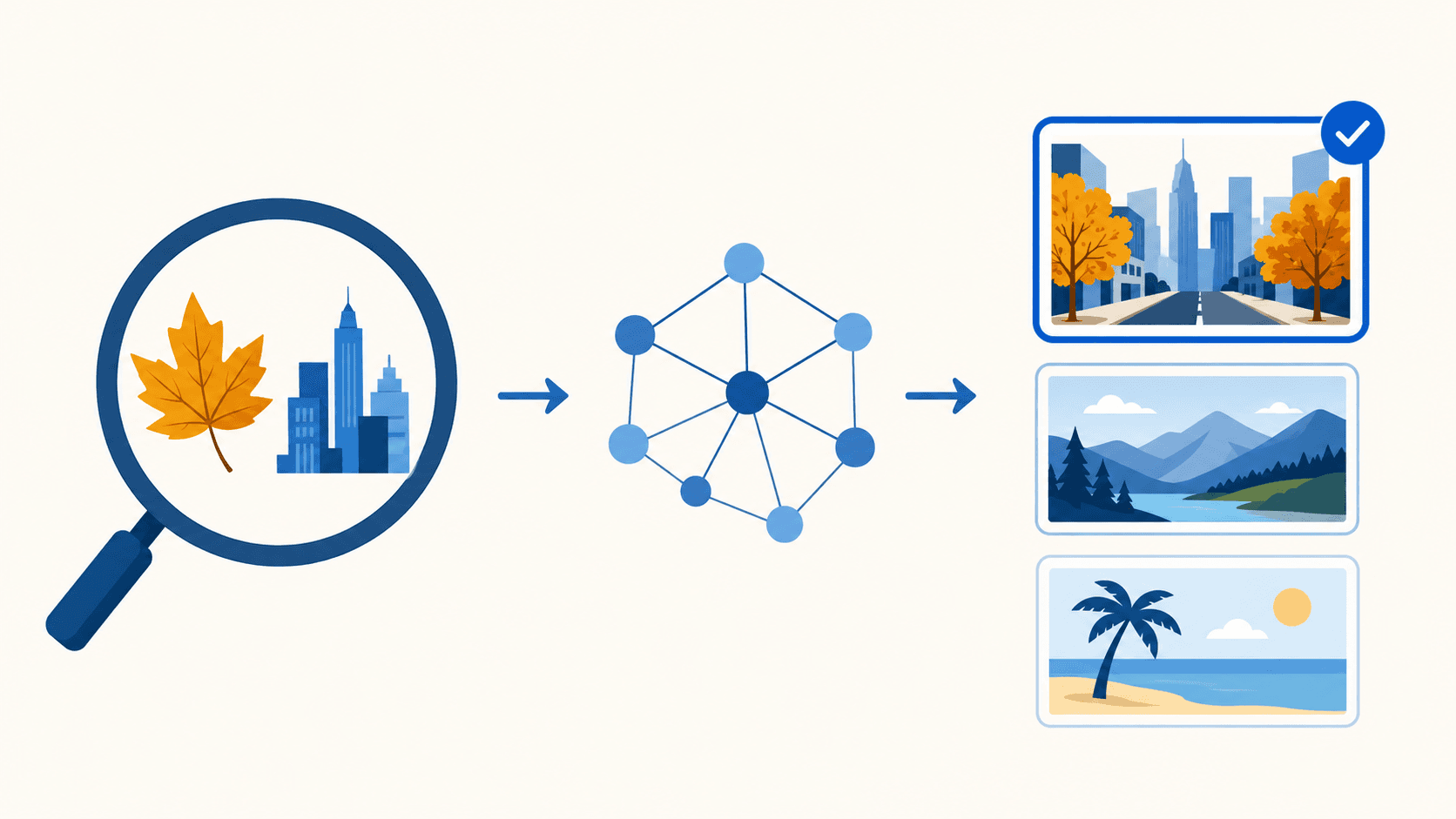
Traditional search compares the entered term with file names, descriptions, tags, and other metadata. If a user searches for “autumn city,” the system will typically display assets containing the same label.
The problem arises when the content has been described differently. A photograph may have been labeled “urban street in October,” even though its meaning matches the original query. Traditional search may fail to recognize this connection.
The result therefore depends on whether the user applies the same terminology as the person who uploaded the asset. In extensive libraries managed by multiple teams, achieving this match becomes increasingly difficult.
The asset may exist in the system but remain virtually inaccessible to most users. As a result, the organization may create new content simply because the original material could not be found.

From words to the meaning of a query
What is semantic search in DAM? It is a search method that attempts to understand the meaning and intent behind a user’s query. It is not limited to checking whether an entered word appears in a file name or description.
Users can enter a complete request, such as “product photograph on a light background,” “autumn landscape without people,” or “modern office with natural light.” The system then searches for content that matches the meaning of the request.
This makes searching more similar to everyday communication. Users do not need to know the organization’s internal terminology or try several similar expressions.
Semantic search can also work with synonyms and semantically related terms. Even if an asset is described using different words, it may still appear among the relevant results.
How the system compares meaning
Semantic search is based on models that convert content and textual information into numerical representations known as vectors. In simplified terms, a vector can be understood as a mathematical description of an asset’s semantic characteristics.
The user’s query is processed in the same way. The system then compares the similarity between the query and the content in the library. It ranks the results according to how closely they match the intended meaning.
For images, the analysis may consider the objects shown, the setting, colors, composition, or atmosphere. For documents, it works with their text and topics. Video and audio can be made searchable using automatically generated transcripts.
The entire process takes place in the background. Users do not need to understand vectors or indexing methods. They simply use the search field and enter a naturally worded query.
Semantic search complements other methods
Meaning-based search is not intended to replace every existing search method. If a user knows the exact product code, document number, or campaign name, full-text search and metadata may provide a faster result.
Semantic search is more suitable for general requests. It helps users search by topic, setting, mood, or intended use. Visual search is useful when users want to find an image similar to an existing reference.
Filters serve a separate purpose. They allow users to narrow the results by format, language, market, approval status, or license validity.
The most accurate results therefore come from combining several methods. Users first describe the desired content in their own words and then narrow the results using verified metadata.
Metadata still provides essential context
The ability to search by meaning may create the impression that metadata is becoming unnecessary. In reality, metadata provides information that content analysis alone cannot always determine reliably.
The system may recognize what is shown in a photograph. However, it may not know whether the image has been approved, who owns the rights, or when its license expires. It may also be unable to determine whether it is the current version intended for a particular language and market.
Metadata therefore stores organizational, legal, and commercial information. Semantic search helps users discover a relevant asset, while metadata confirms whether it can be used safely.
A well-configured DAM system combines automated content analysis with a controlled structure. Artificial intelligence makes searching easier, while metadata maintains control over how files can be used.
When semantic search delivers real value
The value of semantic search increases with the size and diversity of the digital library. If an organization manages a small number of well-labeled files, traditional search may be entirely sufficient.
Semantic search makes sense when users often do not know file names, use different expressions, or search according to general content characteristics. It can also help with older assets that have incomplete metadata.
It is also valuable for organizations working in multiple languages. Employees may describe the same content using different terms. Search based solely on exact word matches then produces limited results.
However, the implementation of semantic search should reflect actual user behavior. It is important to monitor queries that return no results, repeated searches for the same content, and situations in which employees work around the DAM system.
How to integrate semantic search into everyday workflows
The first step should be to select a smaller but representative part of the digital library. This subset can be used to test common user queries and compare the results with traditional search.
The test should evaluate accuracy, result ranking, and the ability to refine results using filters. It should include short expressions, complete sentences, synonyms, and different ways of describing the same content.
Semantic search also requires clearly defined access permissions. Users should only receive results they are authorized to access. It is equally important to preserve metadata relating to licenses, approvals, and validity periods.
BrandCloud centralizes digital assets, metadata, versions, and access permissions. Content managed in this way creates a strong foundation for advanced search. Users can discover suitable assets more easily while also verifying their relevance, status, and conditions of use.
When DAM understands what you are looking for
Semantic search brings DAM closer to the natural way people communicate. Users do not need to know the exact file name or consider how the asset was originally labeled. They simply describe the content they need.
The greatest value comes from combining semantic search, metadata, and filters. The DAM system can then find content that matches the intent behind the query while also helping users verify that it is current, approved, and ready to use.