Companies today work with thousands of digital files. Photos, videos, graphics, presentations, documents, and campaign materials are created every day and are often used by dozens of people across the organization. Without a clear system in place, these assets can quickly turn into a disorganized archive where finding the correct file version or verifying whether an asset is still approved for use becomes difficult.
This is exactly why Digital Asset Management (DAM) systems were created. Their purpose is not just to store files, but to manage their entire lifecycle. If you're interested in how DAM differs from CMS platforms or standard cloud storage solutions, BrandCloud's blog covers these topics in more detail. In this article, we'll focus on how DAM works and walk through the entire process step by step.
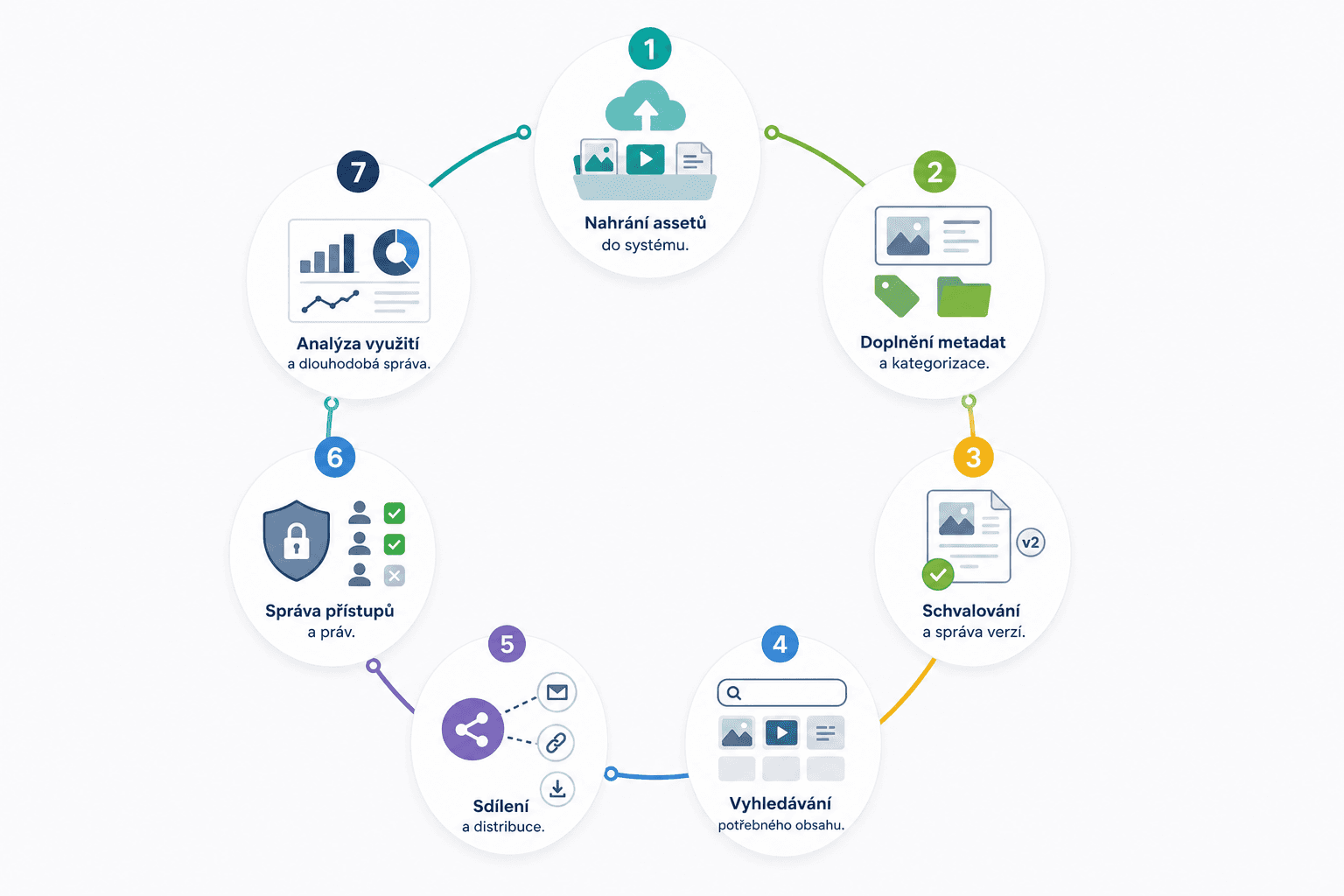
1. Uploading Digital Assets to the System
Everything starts with uploading files into a DAM system. Assets can be uploaded manually, imported in bulk, or transferred automatically from other tools such as design software, e-commerce platforms, or marketing systems.
These assets most commonly include photos, videos, logos, product materials, advertising banners, presentations, and brand-related documents.
At this stage, the DAM system creates a centralized location where all files are accessible from a single environment. This eliminates the common problem of content being scattered across emails, shared drives, and individual employee storage locations.
2. Adding Metadata and Categorization
Once assets are uploaded, the next step is content organization. A DAM system assigns metadata to assets, providing information that makes them easier to find and manage.
Metadata may include the file name, author, product line, language, creation date, copyright information, or campaign type.
Many modern DAM systems can generate some metadata automatically. For example, they can identify objects, people, or locations in photographs and apply relevant tags.
Metadata is one of the main features that distinguishes DAM from traditional cloud storage. Instead of relying solely on folders, DAM systems use structured information that enables advanced filtering and precise search capabilities.
3. Approval Workflows and Version Control
Once assets have been organized within the system, review and approval processes can begin.
For example, a marketing team may upload several banner variations for evaluation by a brand manager or another responsible stakeholder. After approval, the asset is marked as current and ready for use.
At the same time, DAM systems maintain a complete history of changes. If a designer updates a logo or edits a product image, each version is stored, making it possible to retrieve previous versions whenever needed.
This significantly reduces the risk of someone using an outdated file or an unapproved piece of content.

4. Finding the Right Content
This is where the real value of DAM becomes apparent.
Imagine a marketing team preparing a new product campaign and needing approved product photos, the latest logo version, and campaign banners for several markets within minutes. In a traditional folder structure, locating these files could take a considerable amount of time. In a DAM system, users can simply rely on metadata, filters, or full-text search.
Users do not need to know where a file is stored. They can search by product name, campaign, language, or another parameter, and the system will return relevant results within seconds.
In larger organizations, a DAM platform may contain hundreds of thousands of assets. Without metadata and advanced search capabilities, managing such a volume of content would be extremely difficult.
5. Sharing and Distributing Assets
Once the right file has been found, it can be put to use.
DAM systems make it possible to share assets securely both internally and externally. Users can generate links, create collections for specific projects, or provide selected content to partners, distributors, and agencies.
One of the main advantages is that everyone works with the same file version. If an asset is updated, there is no need to resend email attachments or replace files in multiple locations.

6. Managing Access and Permissions
Not every employee needs access to every asset.
DAM systems therefore allow organizations to define permissions based on teams, departments, or user roles. A designer may have editing rights, the sales team may only be able to download files, and external partners may be granted access to selected materials only.
Many DAM platforms also include license and copyright management features. The system can alert users when a license is about to expire or prevent the use of assets that are no longer approved for public communication.
7. Usage Analysis and Long-Term Management
An asset's lifecycle does not end once it has been published.
DAM systems track which files are used most frequently, who is accessing them, and whether they remain current. This gives organizations valuable insight into how effectively their digital content is being utilized.
Over time, outdated materials can be archived, duplicates removed, and the asset library kept organized as content volumes continue to grow.
Key Takeaways from How DAM Works
A DAM system is much more than a file repository. Its role is to manage the entire lifecycle of digital assets—from upload and organization to approval, distribution, and archiving.
The process can be summarized in seven steps:
- Uploading assets to the system.
- Adding metadata and categorization.
- Approval workflows and version control.
- Finding the right content.
- Sharing and distribution.
- Access and permission management.
- Usage analysis and long-term maintenance.
The combination of these capabilities is what sets DAM apart from standard cloud storage solutions and systems designed primarily for content publishing.
BrandCloud enables centralized management of digital assets throughout their entire lifecycle. Companies gain a single source of truth for storing, searching, approving, and distributing content, helping maintain order across digital materials while ensuring consistent brand management.
As the volume of digital content continues to grow, simple file storage is no longer enough. Organizations need visibility into where content is stored, who is using it, and whether it complies with current brand guidelines. This is why DAM has become an essential component of modern digital asset management and long-term brand governance.