Vector graphics are the foundation of most modern visual identities. Logos, icons, illustrations, and pictograms are typically created in vector format because they retain perfect quality regardless of size. Yet questions about the different file formats are common. When should you use SVG? What is AI used for? Is EPS still relevant? And why is PDF often the standard for print?
Choosing the right format affects the quality of the final output, collaboration between designers and marketing teams, and the long-term management of digital assets. Let's explore how these formats differ and when each one makes the most sense.
What Is Vector Graphics?
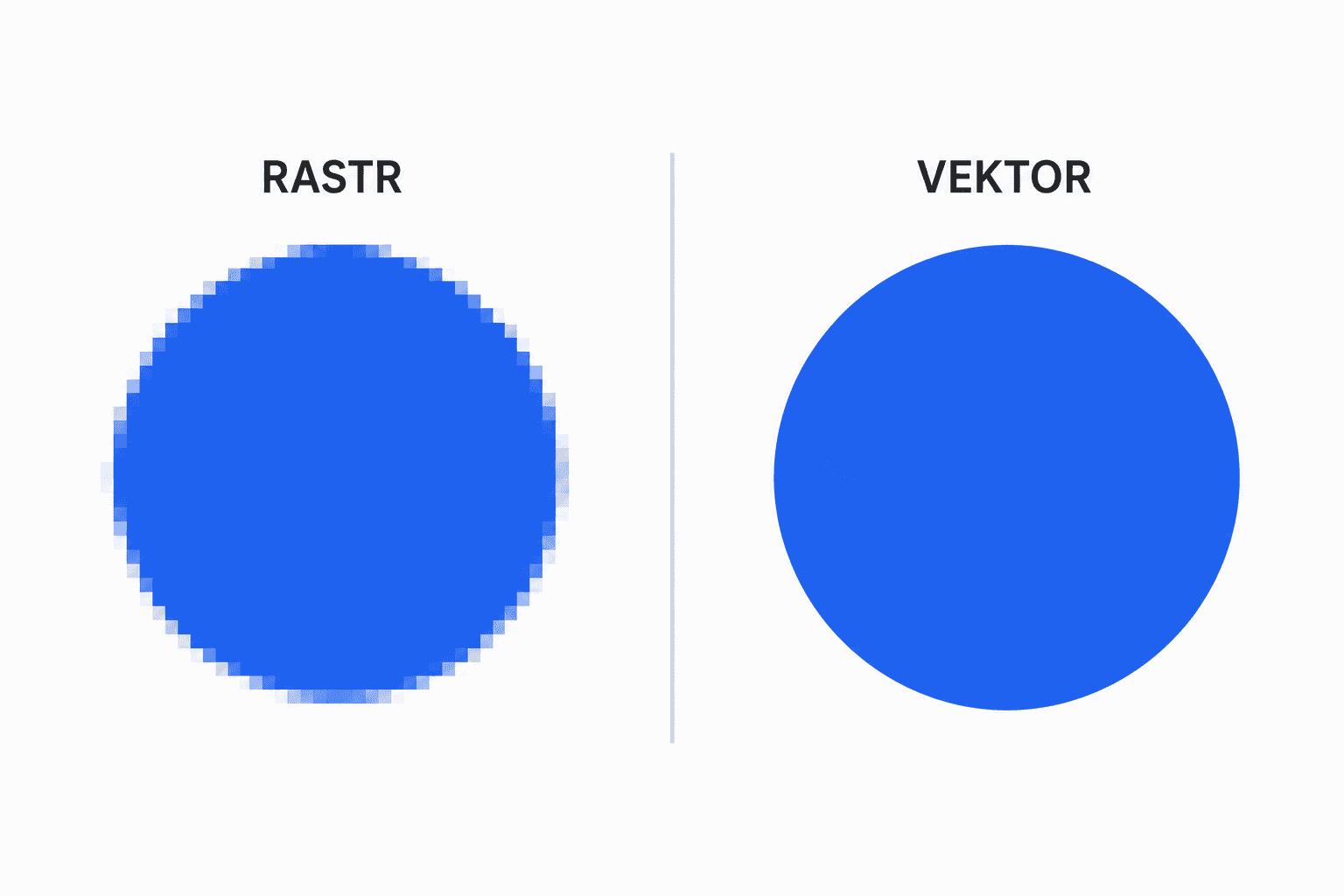
Unlike raster graphics, which are made up of pixels, vector graphics are based on mathematical descriptions of points, lines, and curves. This allows an image to be scaled up or down without losing sharpness.
That's why the same logo can be used on a business card, a website, and a large billboard without creating multiple versions at different resolutions.
How Does Vector Graphics Work?
The theoretical foundation of vector graphics lies in analytical geometry. Each object is mathematically defined and consists of points, curves, and fills. As a result, individual shapes can be edited at any time—their color, size, or form can be changed without affecting image quality.
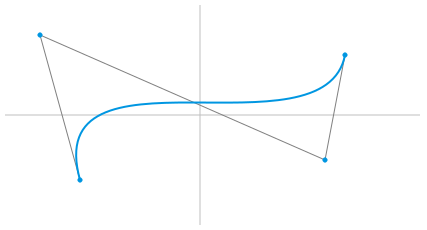
Most graphic design software relies on Bézier curves, named after the French mathematician Pierre Bézier. These curves are defined by two anchor points and two control points that determine the curve's shape. This approach makes it possible to create smooth shapes ranging from simple icons to complex logos and illustrations.
For this reason, vector graphics are used wherever precision, easy editing, and scalability are required.
Overview of the Most Common Vector Graphics Formats
Each vector format was designed for a different purpose. Some are ideal for web use, while others are better suited for editing or printing.
SVG
SVG (Scalable Vector Graphics) is an open format primarily intended for digital environments. It remains sharp on displays of any size, supports animations, and can be styled using CSS or JavaScript.
Common uses:
- Website logos
- Icons
- Illustrations
- Infographics
- User interfaces
AI
AI is the native file format of Adobe Illustrator. It stores layers, text, and all editable objects, making it the primary working file for designers.
Best suited for:
- Logo design
- Visual identity development
- Long-term storage of source files
- Ongoing graphic editing
EPS
EPS is one of the oldest vector formats. Despite its age, it is still used in professional printing and in workflows that rely on older printing technologies.
If a print provider requires EPS, it remains a reliable choice. For everyday file sharing, however, PDF has replaced it in most cases.
Today, PDF is used for much more than documents. It can also preserve vector graphics, fonts, and color profiles, making it one of the most popular formats for sharing design files.
It is commonly used for:
- Print-ready artwork
- Design approval
- Sharing logos and illustrations
- Delivering files to clients or print shops
How to Choose the Right Format
The right format depends primarily on how the graphic will be used.
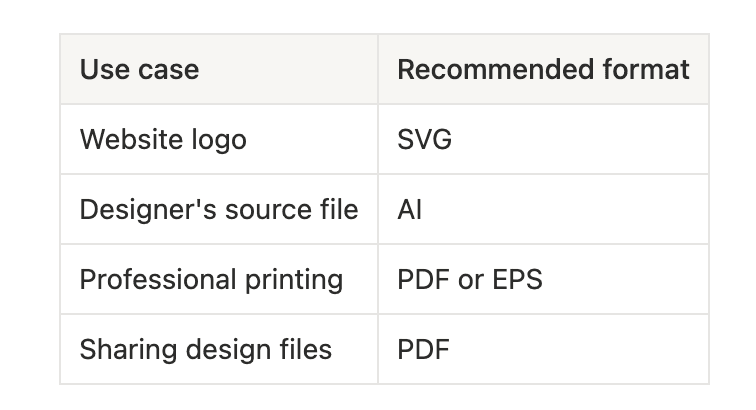
In addition to vector formats, designers often prepare raster exports in PNG or JPG format. These are useful when further editing is unnecessary or when fixed image resolution is acceptable, such as for presentations, office documents, or social media.
Why Vector Graphics Remain Essential
Despite the enormous amount of digital content created today, the importance of vector graphics has not diminished. On the contrary, brands use the same logos and graphic elements across countless touchpoints—from mobile apps and websites to large-scale advertising.
Some of the main advantages include:
- Sharp rendering at any size
- Easy editing of individual objects
- Smaller file sizes for simple graphics
- A single design that works for both print and digital media
- Long-term usability of graphic assets
There are situations, however, where raster graphics are the better choice. Photographs and highly realistic illustrations contain a vast amount of detail, making formats such as JPG and PNG more efficient.
A simple rule of thumb is this: if your graphic consists of shapes, lines, and text, choose vector. If you're working with photographs, a raster format is usually the better option.
Managing Files Is Just as Important as Choosing the Right Format
Selecting the correct format is only one part of the process. It's equally important to ensure that everyone is working with the latest version of a logo or illustration.
In larger organizations, it's common for multiple versions of the same file to be scattered across local drives or email attachments. The result is inconsistent branding and unnecessary revisions.
BrandCloud enables centralized management of digital assets, including vector files. Marketing teams, designers, and external partners always have access to approved versions of logos, icons, and other brand assets, making it easy to download the right format for any specific use.
The Right Format Saves Time and Protects Brand Consistency
Choosing between SVG, AI, EPS, and PDF is more than a technical decision. Each format serves a specific purpose and performs best in different scenarios. Understanding when to use each one helps designers, marketers, and print providers work more efficiently.
Equally important is the way design files are managed. Well-organized and easily accessible digital assets help maintain a consistent visual identity while streamlining day-to-day brand management. When the right file format is combined with effective asset management, it creates a strong foundation for consistent, high-quality visual communication.